

When performing a Pentest, it's much easier to take advantage of the lack of awareness among network/security administrators who don't realize how we can use different techniques to compromise networks, even when Firewalls are in place.
This information will be useful for both Pentesters and those in charge of defending the network.
Many believe that by installing Firewalls or NGFWs (Next Generation Firewalls), they'll be 100% protected from network attacks. However, although NGFWs have added an extra layer of complexity for APTs (Advanced Persistent Threats), there's no doubt that if they aren't properly configured, they can be bypassed.
When we talk about Hacking and Bypassing Firewalls, we rarely mean opening a closed port on the Firewall to gain local access. Instead, we usually talk about ways to use the Firewalls and their configurations to pass malicious traffic into the organization.
To understand how to bypass a Firewall, let's cover some theory and discuss Bind TCP and Reverse TCP—two of the methods we use to establish communication between the compromised host and the attacker's machine, though they aren't the only ones.
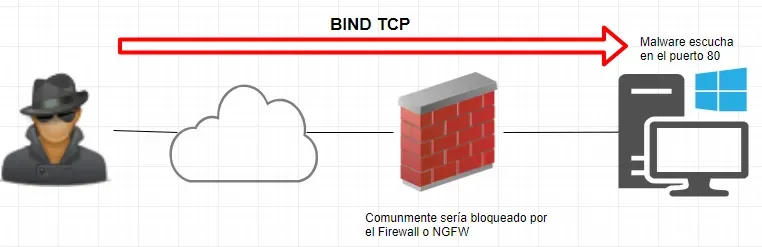
With Bind TCP, the attacker connects to the victim's machine. The malware is designed to open a port on the compromised host, and the attacker uses that port to communicate with it. Firewalls/NGFWs will block these attacks, because the port is opened on the compromised host, not on the Firewall.
With Reverse TCP, the compromised host communicates back to the attacker's machine. In this case, the malware makes the compromised host constantly reach out to the attacker.
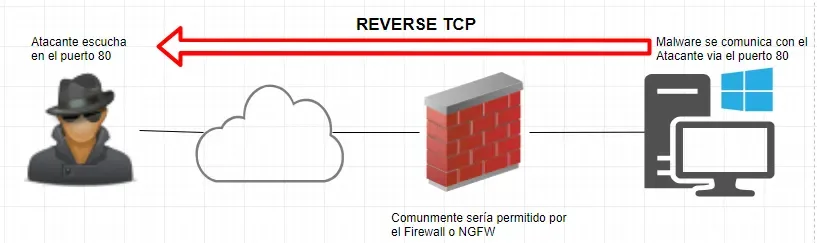
This is why attackers prefer Reverse TCP—they don't need to open any ports on the Firewall. They can communicate with an external host using well-known ports like HTTP (TCP 80) or HTTPS (TCP 443), which are commonly allowed in organizations.
This is where NGFWs stand above traditional Firewalls that can't perform traffic inspection on their own. An NGFW has the ability to evaluate the content of the traffic. If you're using a traditional Firewall, it's very likely that any malware can pass through your network without any issues. The alternative is to use IPS/IDS to monitor network traffic.
Recommendation #1 – Enable IPS/IDS on all inbound and outbound traffic.
Without IPS/IDS capabilities, we are unfortunately exposed to any type of Malware. That's why it's important to enable IPS/IDS not only on traffic going from the internet to the servers, but also on traffic from clients to the Internet—because of the Reverse TCP issue.
Recommendation #2 – Block everything, allow only what's necessary.
This tends to be one of the most common security measures, but don't be surprised that many organizations simplify their lives by using Allow ALL. Sometimes, when facing a communication issue, they use Allow ALL to "fix it quickly and adjust later"—and unfortunately, later never comes. This gap could be exploited by attackers to compromise the organization. Let's see an example of why this is a problem:
Take the SMB protocol on TCP 445—it's commonly used for internal communications and not recommended for public connections, since it can be leveraged for credential theft or antivirus bypass.
Let's say User X receives a PDF by email.

When the user opens the PDF, it sends the hash in NTLMv2 format. This hash can be cracked to obtain the user's password, so this port should be blocked.
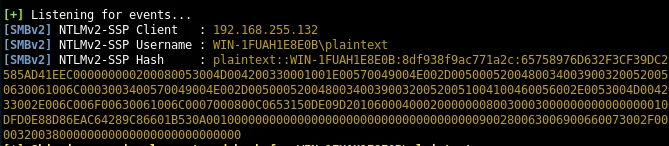
To create the PDF I used bad-pdf, to receive the hash I used Responder, and the password can be cracked using John The Ripper (installed by default in Kali).
Recommendation #3 – Block unknown sites.
Some NGFW solutions allow web filtering, and you'll always find a category like Unknown, Unregistered, or something similar that refers to a domain that hasn't been categorized yet due to limited information. Why block this traffic?
Typically, an attacker will want to social-engineer a company. If the attacker doesn't have a categorized website, they'll have to buy an uncategorized domain to create their phishing campaign. If we keep blocking unknown sites, we could prevent these phishing campaigns.
The concept behind this is similar to the WhatsApp-Protector project I built—follow the link for more information.
Recommendation #4 – Enable SSL Inspection on all allowed ports.
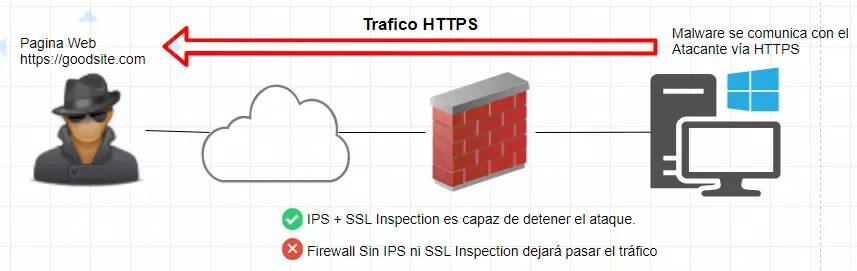
Some NGFWs by default only perform SSL inspection on communications that use SSL/SSH, such as HTTPS, SMTPS, IMAPS, FTPS, etc. However, this could allow an attacker to use the HTTP protocol or TCP port 80 to pass encrypted traffic without it being validated by SSL inspection.
An attacker could use the link https://myhackersite.com:80 and this traffic would not be inspected—consequently, an attacker could bypass any IPS/IDS. Even if you allow non-SSL ports, you should still inspect those ports.
Note: IPS/IDS commonly use digital signatures to identify patterns in traffic. It's possible that even with these enabled, some unknown Malware could pass through the network undetected by the IPS/IDS. That's why other controls like endpoint protection should be considered to increase security. An NGFW isn't everything.
I hope you find this useful. If you have any questions or suggestions, don't hesitate to reach out.
God bless you! Serving Christ is not a task, but a relationship. Friends of God. Jn 15:15