
Hey! I'll try to tell you my story about how I reproduced CVE-2019-19470. This will be both a personal learning experience and technical examples, but it's not meant to be a tutorial. If you want a more in-depth technical review, check out the original write-up.
All credits for this PoC go to @frycos and @codewhitesec for discovering the bug and their explanation on their blog.
Let's get started...
This is how it all began... One day on Twitter I was looking for things related to "easy" privilege escalation bugs and I came across a tweet from James Forshaw, who was commenting on a privilege escalation published by @frycos from @codewhitesec https://codewhitesec.blogspot.com/2020/01/cve-2019-19470-rumble-in-pipe.html, and I decided to read it.
After reading the article, I had some ideas about how certain things work and was familiar with most of the content shared. The best part about this article is that they didn't publish the PoC, so I decided to replicate it and create my own proof of concept.
CVE Summary
To give you an idea about this vulnerability, basically TinyWall.exe is a firewall application that runs as SYSTEM. It has a Named Pipe interface intended to communicate only with the TinyWall process. The bug occurs due to a deserialization attack, where it's possible to serialize a command and send it through the Named Pipe by spoofing the process name to achieve command execution as SYSTEM.
The process of replicating the exploit
I read the article several times and decided to work on each piece separately. I'll mention each one and explain the approach I took to learn how they work.
Note: The order of this blog is not necessarily the order in which I did things, or how I learned them. In practice, let's say I started with Named Pipes, but when some things didn't work, I jumped to dnSpy, went back to Named Pipes, read and researched PEB and deserialization, etc. It was messy research — in this post I'll try to share my learning at each stage.
Named Pipes
I had heard of, maybe played a little with Named Pipes, but I felt I needed to read and research more about them, so my approach was to do two things:
- Read about Named Pipes — what they are, how they work, and why people use them.
- Research bugs related to Named Pipes — papers, videos, blogs, etc.
Basically, Named Pipes provide inter-process communication, with one process acting as a server and another as a client. For more information go here.
After reading several articles about Named Pipes, I created a basic server/client application in C# to see them in action. In the application, the server had a file available, and when the client connected it would grab the file and copy it to a directory. The code is available here.
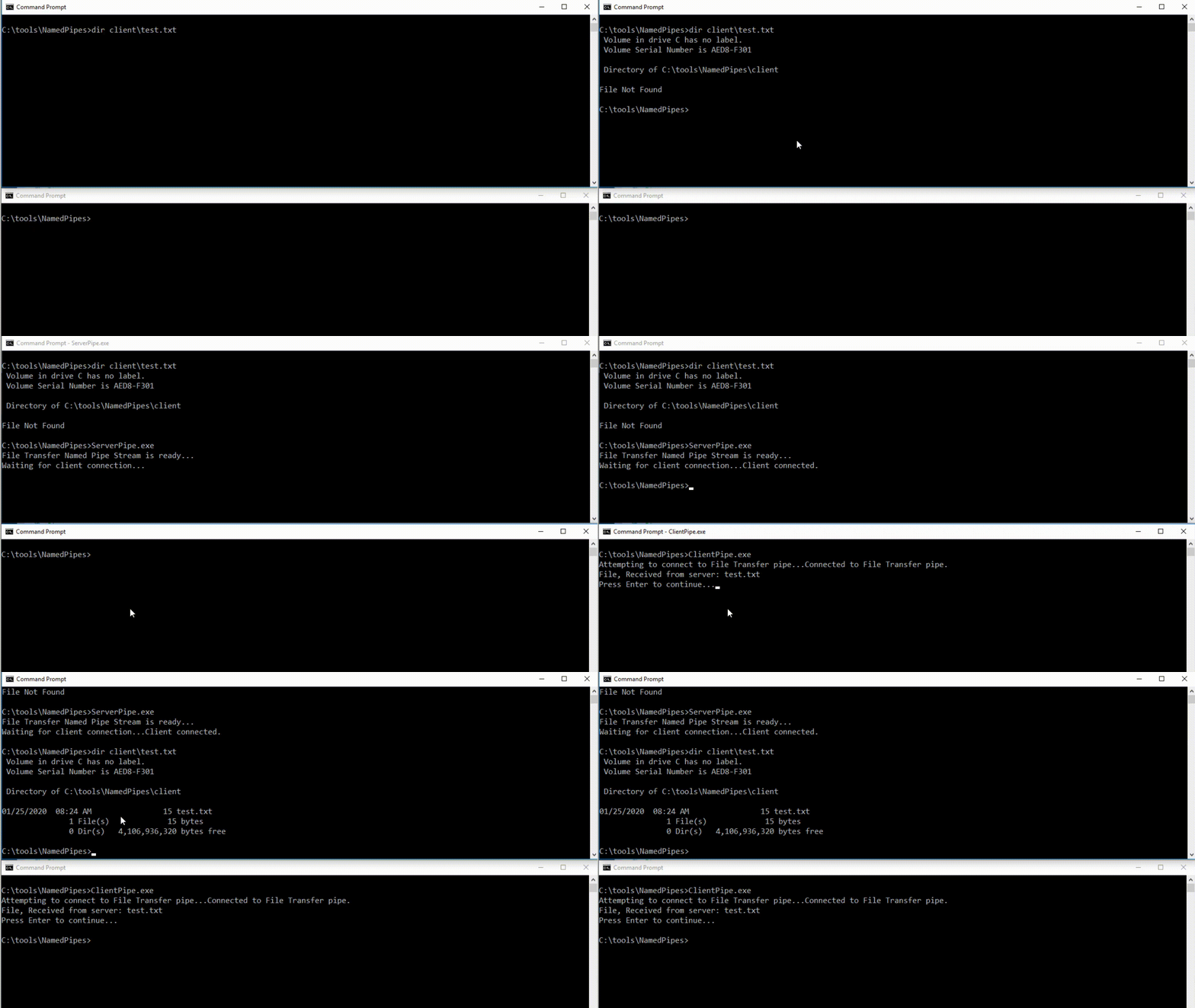
With a better understanding of how Named Pipes and inter-process communication work, I tried to replicate the same deserialization method that TinyWall uses and execute code from one application (Named Pipe Server) to the other (Named Pipe Client), and I did it using the example that @frycos provides in his write-up to pop a calculator.
Everything I've written so far sounds super easy, but the truth is it didn't come easily. During this process, I read a lot and tried things that didn't work. I also downloaded IO Ninja, a tool that lets you sniff Named Pipes among other things. I discovered it while watching a video of Gil Cohen discussing Named Pipes and how to abuse them in his talks at Defcon and HIP17.
Deserialization
The starting point for this research was ysoserial.net, a collection of utilities discovered in common .NET libraries that can, under the right conditions, exploit .NET applications into performing unsafe object deserialization.
While researching deserialization, I watched 2 or 3 videos from Álvaro Muñoz @pwntester, the author of ysoserial.net, and read some of his research and bugs he found. I didn't save all the links from what I read about him, but you can check out this video that I loved:
Attacking .NET Deserialization – Álvaro Muñoz
Álvaro also added James Forshaw's TypeConfuseDelegate utility to his tool. tiraniddo is essentially the godfather of privilege escalation — some of his research and tools have opened the doors for more researchers to find bugs based on his work! Thank you for your incredible research, books, videos, etc.
Ysoserial.net, as Álvaro mentions, was inspired by Chris Frohoff's ysoserial project, the Java version. If you'd like to understand a bit better how to use it before continuing, you can see how I used it to exploit Arkham on HTB.
dnSpy
dnSpy allows us to decompile .NET code and extract the source, even set breakpoints, modify variables in real time, etc. — a truly amazing tool: dnSpy.
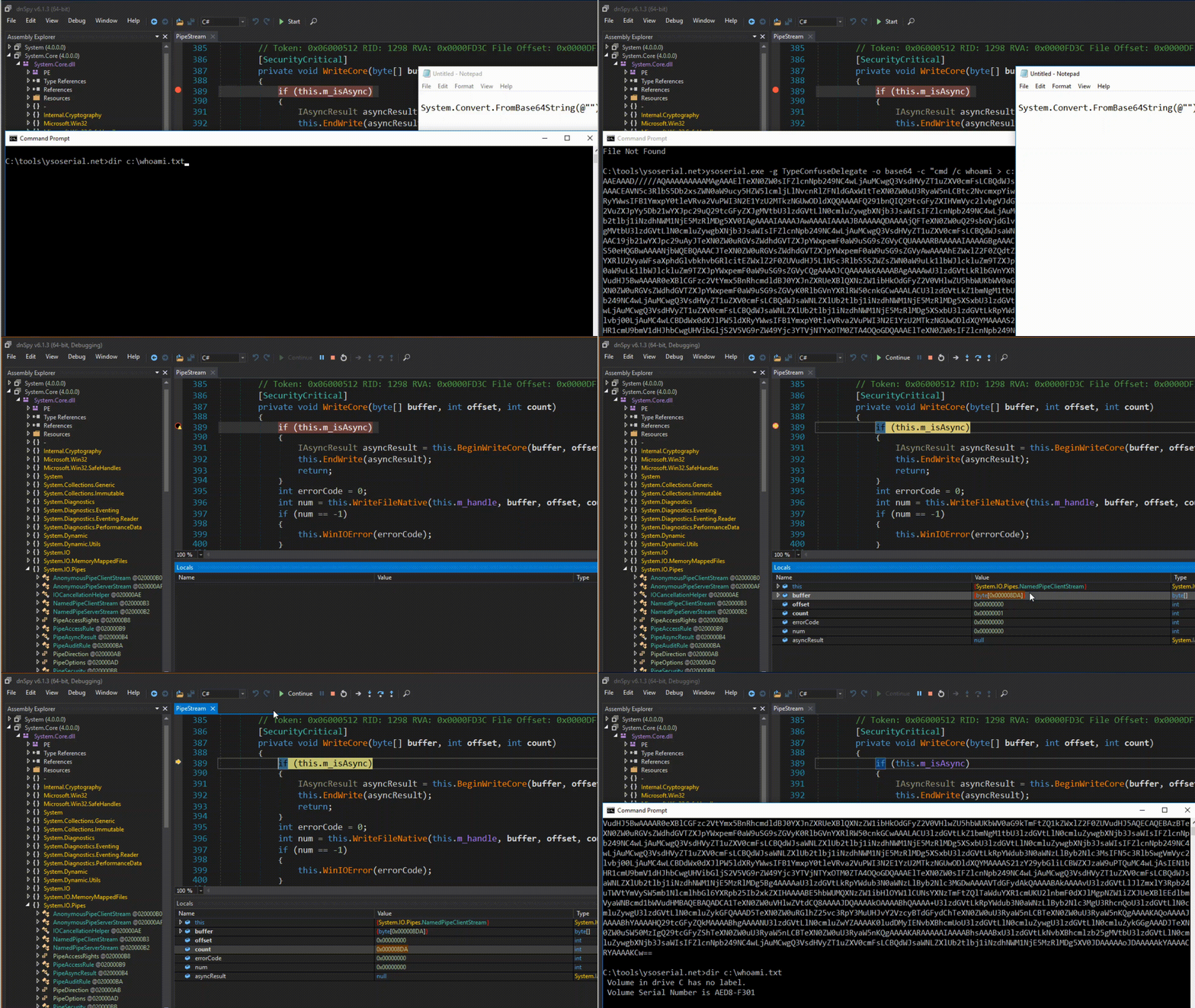
@frycos points out in the post: "Now, we created a malicious object with ysoserial.NET and Forshaw's TypeConfuseDelegate gadget to pop a calc process. In the debugger, we use System.Convert.FromBase64String("…") as expression to replace the current value "
My point here was the following: I understood what this function does (System.Convert.FromBase64String), but how do I use it in dnSpy? I laughed out loud when I figured out what I needed to do — basically it was just copy and paste the text exactly as he mentioned and dnSpy does the rest. Check the gif so you can understand what I'm talking about :D
You don't know what you don't know.
PEB – Process Environment Block
The final piece of the puzzle was the PEB. The PEB is a data structure that applications can use to get information about a process, such as the list of loaded modules, startup arguments, image address, command line values, etc.
WinDbg is a tool you can use to inspect the PEB, for example. I had used WinDbg before to try to understand topics like AMSI, Process Hollowing, etc. — at least I had some idea of how to use it. At this point, my approach was to understand how to modify the PEB manually and then do it programmatically, so I installed WinDbg and followed @spotless's write-up on how to do it, which you can find here.
C# Code to Modify the PEB
After finishing understanding what I had to do with the PEB, I needed to automate the process in C#. Fortunately — or unfortunately — I didn't find any C# code that did PEB manipulation. The only reference I had was FuzzySec's PowerShell script that @frycos mentions in the article: Masquerade-PEB.ps1.
My first idea was to find a way to convert the code to C#. I searched for tools, guides, and more, but I couldn't do it. I was trying to simplify the replication process, but luckily I couldn't. Looking at the Masquerade-PEB code, it seemed very complex to replicate, but I tried anyway, and I could say that out of everything I did, this was the part I enjoyed the most and learned the most from.
The beauty of this replication process is that it helped me better understand how everything works — the classes, the API calls, the calculations to get the PEB parameter locations. Everything started making sense as I progressed, and after some trial and error, reading here and there, I was able to create my own version of Masquerade-PEB in C#.
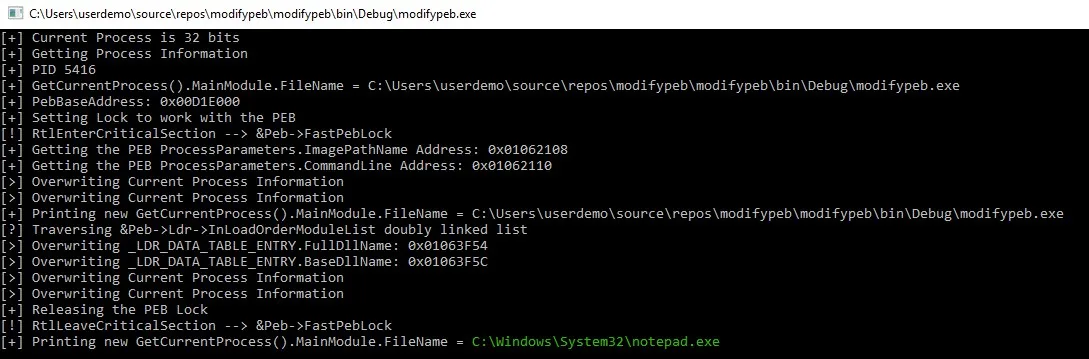

Note: When I tweeted what I did, @Cn33liz pointed out that he did it 2 years ago with the p0wnedShell project. He was also kind enough to point me to this link to help me understand how a piece of the code works.
Running the Exploit
With all the pieces of the puzzle, I just needed to put each one in its place, so I did!
You can find the PoC for CVE-2019-19470 here.
God bless you! Serving Christ is not a task, but a relationship. Friends of God. Jn 15:15